
Kit vs ActiveCampaign for Creators: Which One Fits Your List (and Budget)?
Tools covered: Kit ActiveCampaign GetResponse
Our picks
Best for most creators
Kit
Newsletters, lead magnets, and selling digital products. Simple to set up.
Price: Free plan available. Creator $39/month or $390/year (1,000 subscribers).
Try Kit freeBest for advanced automation
ActiveCampaign
Several funnels at once, a built-in CRM, or high-ticket sales.
Price: Starter from $15/month billed annually. 14-day free trial.
Start a free trialThe short answer: most solo creators should start with Kit. It's built around newsletters, subscriber tags, and selling digital products. It also has a free plan for up to 10,000 subscribers, and its paid Creator plan includes the sequences and visual automations most creators need. Pick ActiveCampaign only if you know you need branching, multi-step automations, features like conditional content and predictive sending, or a built-in CRM. That usually means a course business with several funnels, sales calls, or high-ticket offers. Most creators don't need that, and you'd pay for features you won't use.
The rest of this article covers what each tool costs at your list size, where each one falls short, and who should skip each.
All prices below are as of October 2026, from each company's official pages unless noted. Prices can change, so check the live pricing page before you commit.
Quick comparison
| Kit | ActiveCampaign | |
|---|---|---|
| Built for | Creators: newsletters, digital products, paid subscriptions | Small and mid-size businesses: marketing automation plus CRM |
| Free plan | Yes, up to 10,000 subscribers (no automations or sequences) | No free plan. 14-day free trial |
| Entry paid price (1,000 contacts) | Creator: $39/month billed monthly, or $390/year (about $33/month) | Starter: $15/month billed annually. Monthly billing costs more |
| Automation depth | Visual automations, sequences, rules, tags (Creator and up) | Multi-step automation on every plan. Starter is capped at 5 actions per automation. Plus and up are unlimited |
| Selling products | Built in. 3.5% + $0.30 per USD transaction | No built-in storefront. Connects to Stripe, Teachable, and other tools |
| Learning curve | Lower | Higher |
| Get started | Try Kit free | Start free trial |
What each one actually costs at your list size
Kit pricing (as of October 2026)
Kit has three tiers: Free, Creator, and Pro. They share one rule: you pay for confirmed subscribers, and when your list crosses a tier limit, Kit moves you up to the next tier automatically (Kit billing help).
- Free plan, $0. Kit's pricing page and help center call it the Free plan. Some Kit feature pages call it the "Newsletter" plan. It covers up to 10,000 subscribers, with unlimited forms, landing pages, and broadcasts. It also includes tagging and segmentation, digital product sales, A/B testing, and Creator Network recommendations (paid plans get priority in the Network). You can run a paid newsletter on it too. Visual automations, email sequences, rules, and RSS campaigns require a paid plan. Older reviews say the free plan includes one sequence and one automation. That's out of date.
- Creator, from $39/month or $390/year. Both prices are for up to 1,000 subscribers, per Kit's plan comparison, and we confirmed them in Kit's billing screen in October 2026 after signing up. The "$33/month" you'll see on Kit's pricing page is the $390 annual price divided by 12 ($32.50), so you pay it as one charge per year. Kit describes the annual discount as two months free. Kit's billing help page uses $59/month as its example for the 3,000-subscriber tier. Creator allows two team members, per the same plan comparison.
- Pro, from $79/month. That's for up to 1,000 subscribers, billed monthly. Kit's plan comparison and Pro feature page list these Pro-only extras: Subscriber Signals, Facebook Custom Audiences sync, a newsletter referral system powered by SparkLoop, and unlimited team members. When we checked, Kit's pricing page also showed a limited-time discount on the first year of Pro billed annually. Check the page to see whether it's still running.
For lists above 3,000, use the slider on Kit's pricing page. We couldn't confirm the higher tiers from an official source, and third-party sites disagree.
ActiveCampaign pricing (as of October 2026)
ActiveCampaign has four marketing plans: Starter, Plus, Pro, and Enterprise. At 1,000 contacts, prices are per month in USD, billed annually:
| Contacts | Starter | Plus | Pro | Enterprise |
|---|---|---|---|---|
| 1,000 | $15 | $49 | $79 | $145 |
Sources: ActiveCampaign pricing, ActiveCampaign vs HubSpot, and ActiveCampaign vs Mailchimp. Monthly billing costs more, so check the pricing page if you don't want to pay for a year up front. When you compare with Kit, use Kit's yearly price ($390/year, about $33/month, for Creator at 1,000 subscribers).
For bigger lists, ActiveCampaign's own blog prices Starter at 10,000 contacts at $149/month on an annual basis, or $1,788 a year (ActiveCampaign blog). We couldn't confirm the billing period for the other plans at 10,000 contacts from an official source, so set the slider on the pricing page to your list size to see them.
A few plan details from ActiveCampaign's official pages matter for creators:
- Starter is limited. It allows 5 actions per automation (automation actions help) and one user, and it doesn't include landing pages (ActiveCampaign services). At 1,000 contacts it includes 10,000 email sends per month. Plus has the same send limit and user count. Pro allows 12,000 sends and 3 users (ActiveCampaign pricing).
- Plus lifts the Starter limits. The pricing page lists unlimited automation actions and landing pages on Plus.
- Unsubscribed contacts count toward your limit on new accounts. For accounts created on or after November 3, 2025, every contact counts toward your plan limit, including unsubscribed and bounced ones (ActiveCampaign help). If you don't clean up your list regularly, you can move into a higher price tier sooner than you expect.
- Hitting your limit stops emails from going out. ActiveCampaign doesn't raise your limit for you. Once you're over it, "Send an email" actions in automations are skipped (help article).
- The free trial is small. It lasts 14 days and doesn't require a credit card. The help center lists a cap of 100 email sends during the trial (trial details). That's enough to test the automation builder, but not enough to try it on your real list.
What this means at common list sizes
- Under 1,000 subscribers, newsletter only: Kit Free costs $0. ActiveCampaign has no free option.
- Under 1,000 subscribers, with a welcome sequence or launch automation: Your options are Kit Creator ($390/year, about $33/month) or ActiveCampaign Starter ($15/month billed annually). Starter is cheaper, but the 5-action cap and the lack of landing pages are real limits for a launch funnel. Plus ($49/month billed annually) removes both. On monthly billing, Kit Creator is $39/month and ActiveCampaign costs more than its annual prices.
- Around 10,000 contacts: ActiveCampaign Starter is $149/month billed annually, per its own blog, and it still has the 5-action cap. For Plus and up at this size, check the live slider. Kit Free still covers you at $0 if you only send broadcasts. For Kit Creator at this size, check Kit's slider too.
Is ActiveCampaign's advanced automation worth it?
ActiveCampaign is worth it when your revenue depends on logic that Kit can't express cleanly. Signs that you're in that group:
- You run several funnels at once, and each needs different follow-up depending on what someone clicked, bought, or skipped.
- You sell high-ticket coaching or services and want a sales pipeline (CRM) in the same tool as your email.
- You want features from ActiveCampaign's higher plans, such as conditional content (different blocks of one email shown to different segments), predictive sending, or attribution and conversion tracking. The pricing page lists those on Pro, and marks conditional content and predictive sending as not included on Plus. ActiveCampaign's predictive sending help article also says the feature is for Pro and Enterprise users.
- You use Teachable and want two-way syncing of student data. ActiveCampaign's Teachable integration page lists the integration on Starter, Plus, Pro, and Enterprise. It also has a Stripe integration that syncs customer, order, and subscription data and can trigger automations.
In a thread on ActiveCampaign's own community forum titled "What does ActiveCampaign have that ConvertKit doesn't?", one reply describes ConvertKit (now Kit) as more limited in features and integrations but better suited to creators. G2's comparison page says something similar. Its summary says reviewers found ConvertKit easier to use, set up, and administer, and "felt that ActiveCampaign meets the needs of their business better than Convertkit." On ease of setup, G2 shows Kit at 9.2 and ActiveCampaign at 8.3 (G2 comparison). G2 scores change as new reviews come in, so check the page for current numbers.
If your plan is "send a weekly newsletter, run a welcome sequence, and sell an ebook or course a few times a year," you won't use most of what ActiveCampaign offers.
Kit: strengths, downsides, and who should skip it
What we saw when we signed up (October 2026)
We created a free Kit account on October 29, 2026, to see what a new creator goes through. This covers setup, billing, landing pages, and the automation builder. We haven't sent campaigns to a real list yet, so we can't comment on deliverability or reporting.
Setup is five one-question steps. The steps are labeled Welcome, Audience size, Your brand, Your content, and Your setup, and a progress list on the left shows where you are. Kit asks whether you already use an email tool, how big your audience is (it tells you to count YouTube subscribers and Instagram followers too), your brand or newsletter name, and your website. You can continue without a site, and Kit points out that you can build one with Kit. Then it asks what kind of creator you are (up to three choices, such as Blogger, Author, or YouTuber), whether you sell anything now, and what you want to do first: Grow my list, Send emails, Sell a digital product, or I just want to look around. Getting from signup to the dashboard took us about 10 minutes, mostly because we read every screen carefully.
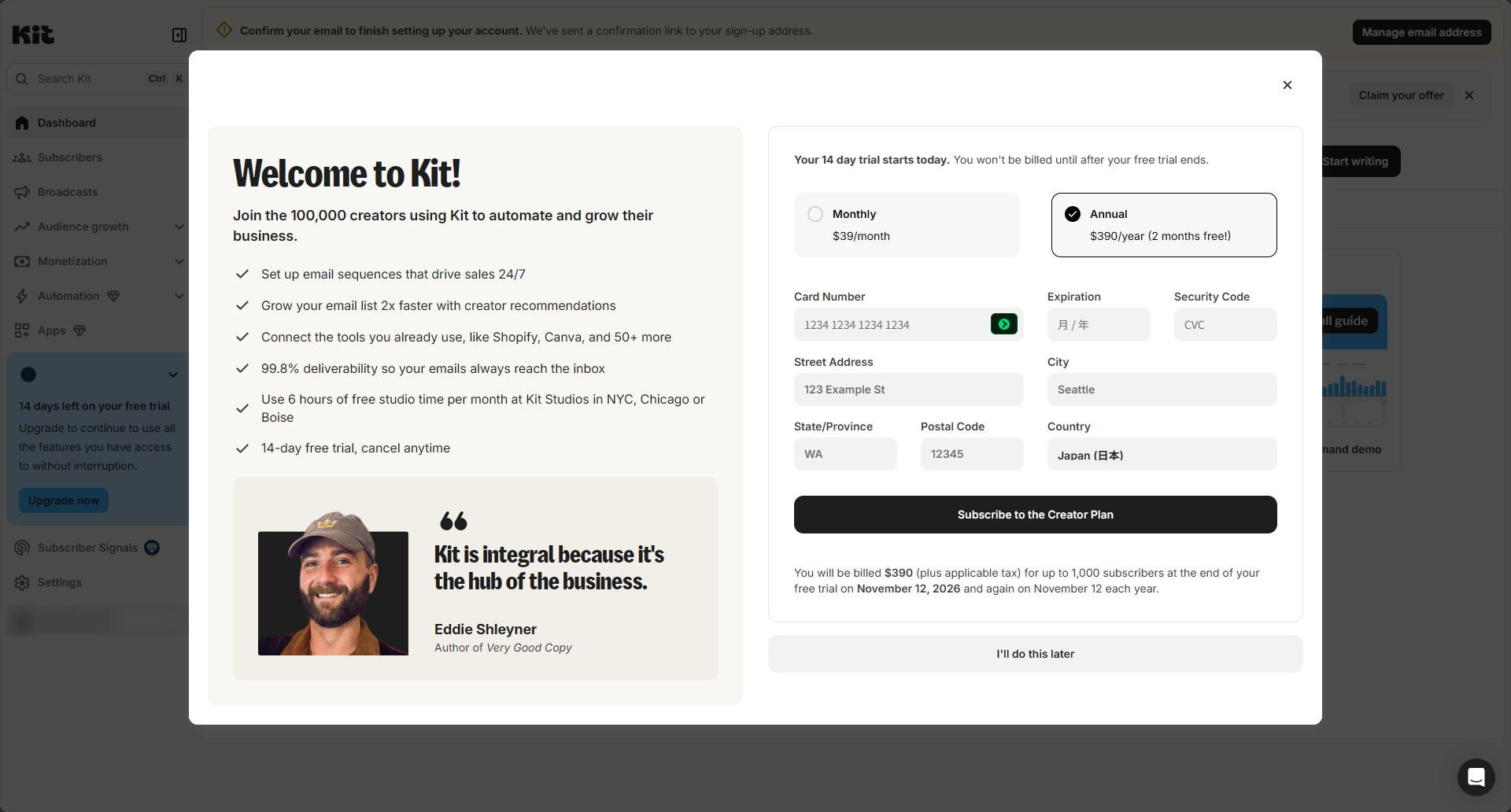
Watch for the trial offer right after setup. As soon as setup ends, Kit shows a large window offering a 14-day free trial of the Creator plan, and it asks for a card. It lists Monthly at $39/month and Annual at $390/year ("2 months free"), with the charge on the day the trial ends. If you want to stay on the free plan, click "I'll do this later" at the bottom. It's easy to miss, and you could end up entering a card without meaning to.
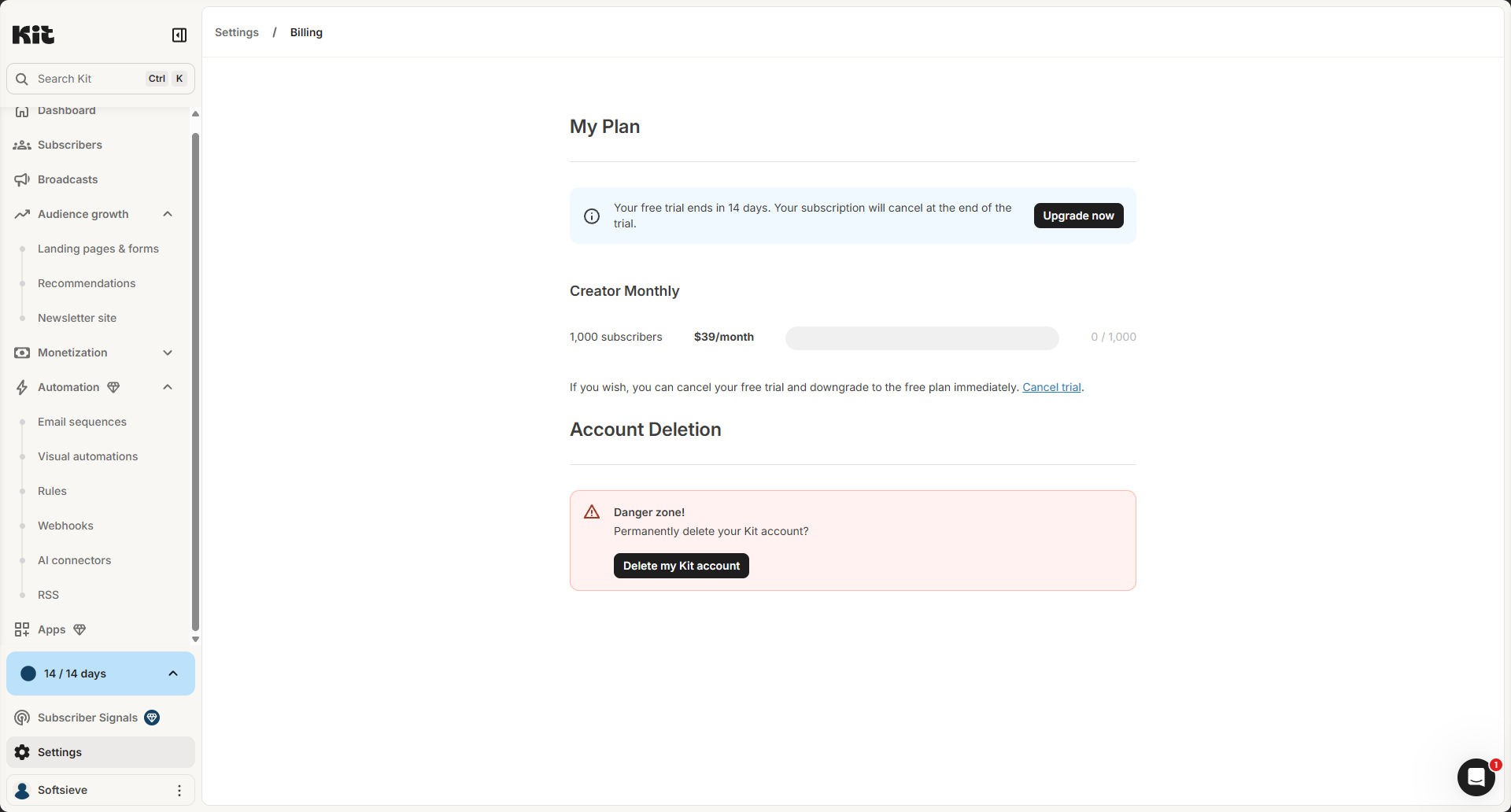
The Creator trial started anyway, without a card. After we skipped the offer, the sidebar still said "14 days left on your free trial." Under Settings → Billing, the account was listed as Creator Monthly ($39/month for up to 1,000 subscribers). The screen said the subscription would be canceled when the trial ends. Based on that screen, if you never add a card, you won't be charged. There's also a "Cancel trial" button that, according to the screen, moves you straight to the free plan. We haven't reached the end of the trial yet, so we can't say what happens to anything you built with paid features once it ends.
Other small things. Kit sends a confirmation email, and clicking the link took effect right away. A few minutes after signing up, a chat message appeared in the corner from a support rep, with the rep's name on it. We couldn't tell whether it was sent automatically.
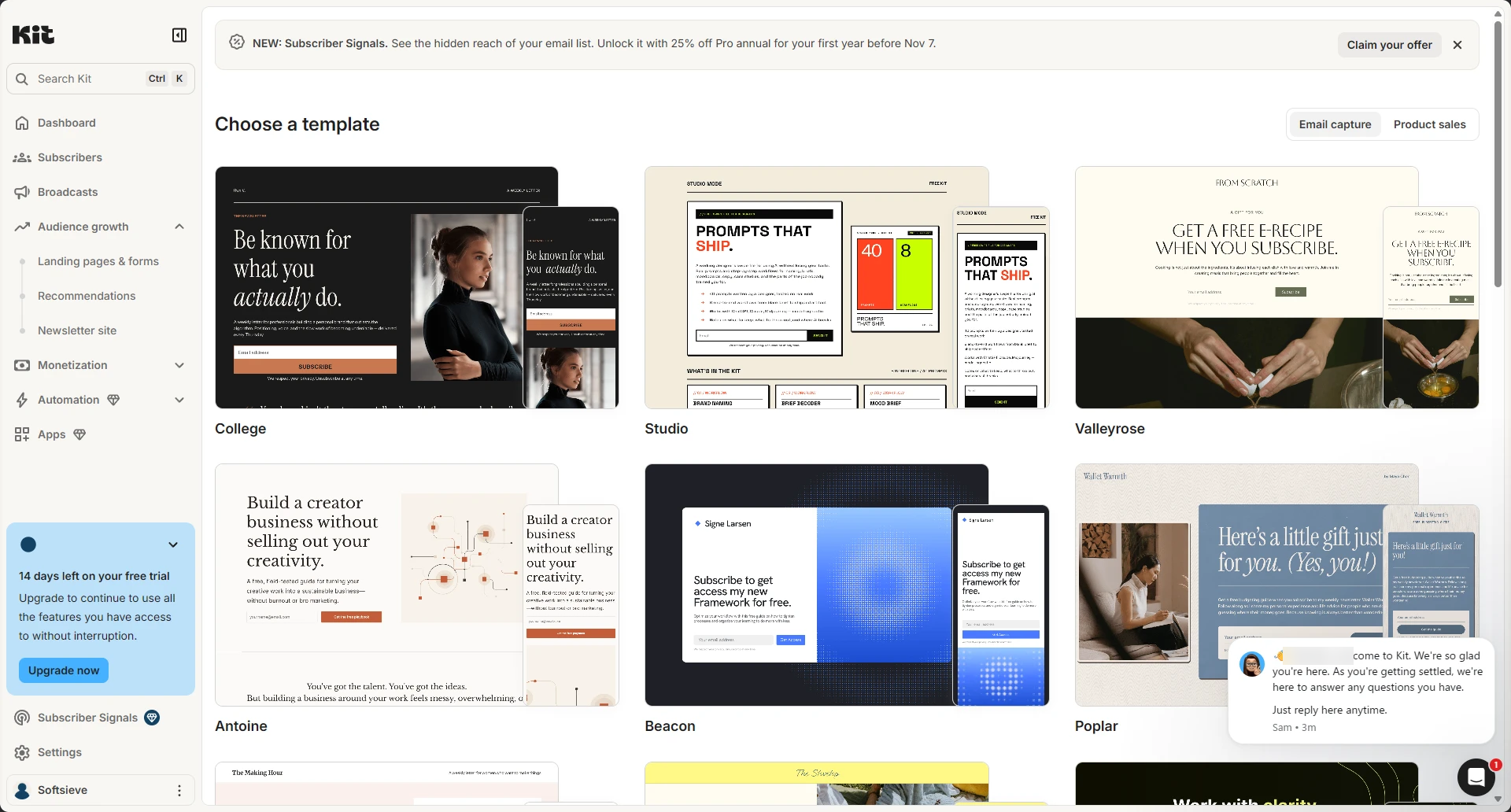
Landing pages and forms. Kit offers two kinds: landing pages that Kit hosts, and forms you embed on your own site. The template picker has two tabs, Email capture and Product sales, and you can preview each design on desktop and mobile.
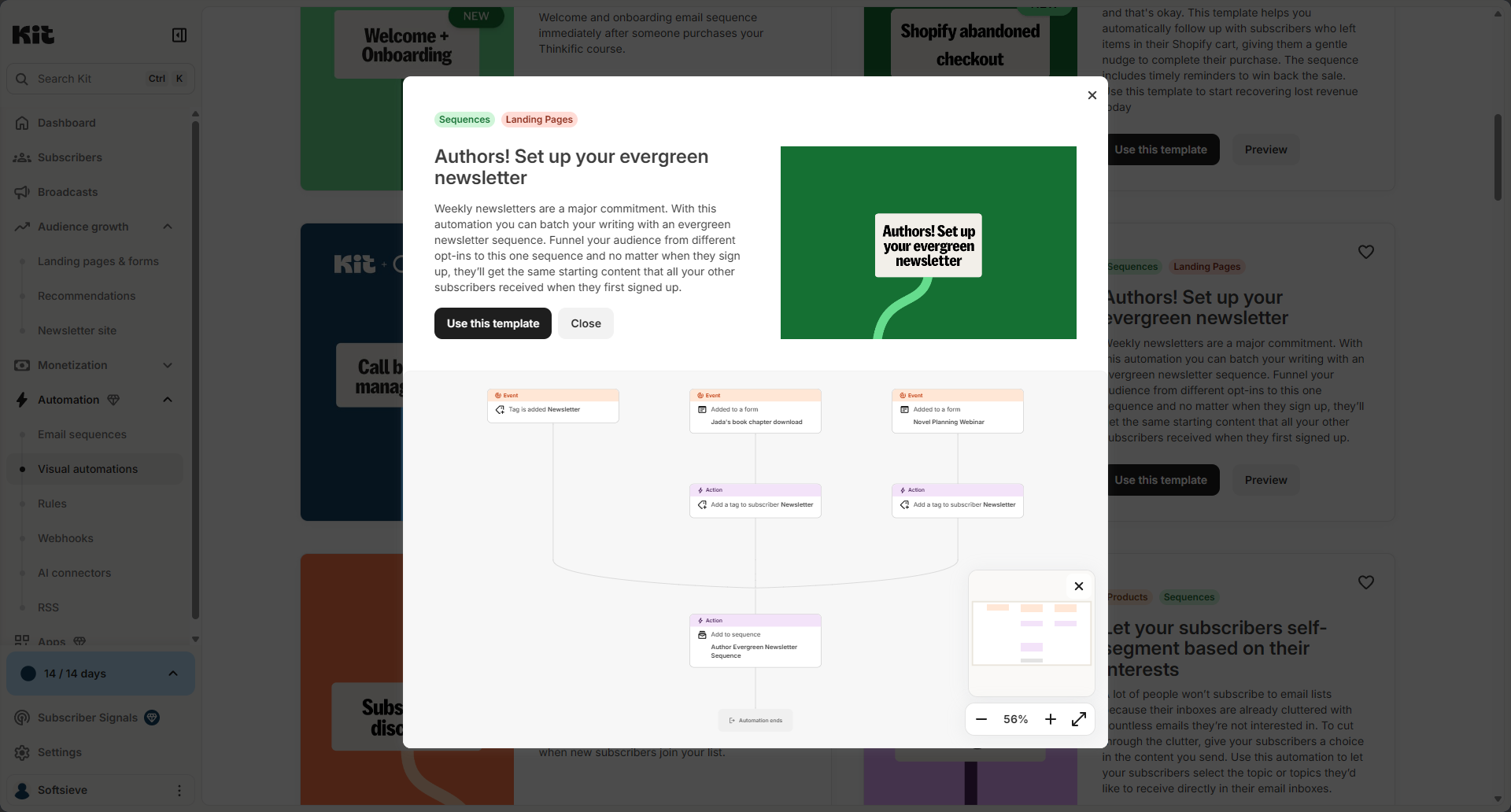
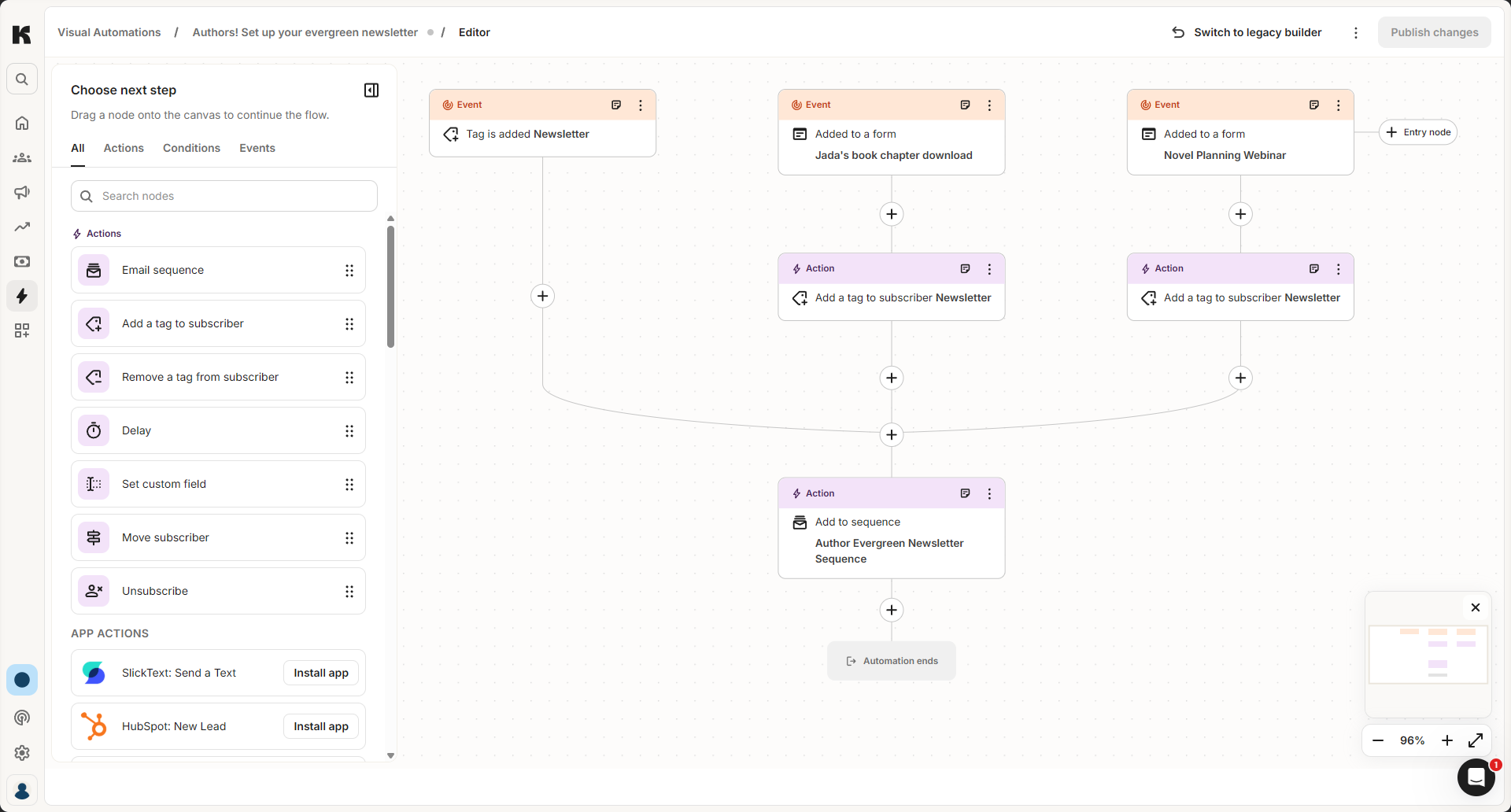
Visual automations work during the trial. In the menu, Automation is marked as a paid feature, and the Visual automations page shows a "Paid feature" label. During the trial, though, we could still create one. Besides a blank "Empty Automation," many templates assume you use another service, such as Typeform, Thinkific, Shopify (abandoned checkout), or Calendly. For newsletter writers, the closest fit was "Authors! Set up your evergreen newsletter." Its preview shows the whole flow before you create anything: three entry points (a tag being added or one of two form sign-ups), then a tag, then a single email sequence.
When we clicked "Use this template," Kit copied the automation into our account. It also created the matching email sequence, with one email in it. The first time we opened the editor, Kit offered a choice between its new automation builder and the legacy one. You can switch back with "Switch to legacy builder" at any time, but Kit said drafts are only saved in the new builder. In the new builder, you drag steps from a "Choose next step" panel, such as email sequence, add or remove a tag, delay, set custom field, move subscriber, unsubscribe, or an outside app. Steps that still need settings are marked "Needs configuration." Nothing runs until you click "Publish changes." Until then, the automation is only a draft.
What this means for you: the automatic trial gives you two weeks to build a welcome sequence or automation on Creator before you decide to pay. If you only want the free plan, skip the card form and keep in mind that automations and sequences are paid features.
Pros, cons, and who it's for
Why creators pick it
- The free plan covers up to 10,000 subscribers, so you can send broadcasts to a sizable list without paying.
- Commerce is built in. You can sell digital products and paid newsletter subscriptions on any plan, including Free. Kit's help center says the fee is 3.5% + $0.30 per USD transaction, with no monthly commerce fee (Kit commerce FAQ).
- Tags, sequences, and visual automations cover the typical creator setups: lead magnets, welcome series, and launch sequences.
- The Creator Network can recommend your newsletter to other creators' readers.
Downsides
- The free plan has no automations or sequences. Once you want even a basic welcome series, you need Creator.
- Right after signup, Kit shows a large Creator trial offer that asks for a card. To stay on the free plan, you have to notice and click "I'll do this later."
- The Pro-only features, such as the referral system, Facebook audience sync, and unlimited team members, double the entry price ($79 vs $39 per month at 1,000 subscribers, billed monthly).
- Automation logic is simpler than ActiveCampaign's, and there's no built-in sales CRM.
- Reviewers on Capterra mention that sequences and visual automations can take a while to understand at first (Capterra Kit reviews).
Who should not choose Kit: businesses that run sales calls or a deal pipeline, ecommerce stores that want deep behavior-based flows, and anyone who already depends on complex if/else automation.
ActiveCampaign: strengths, downsides, and who should skip it
We haven't signed up for ActiveCampaign ourselves. This section is based on ActiveCampaign's official pricing and help pages and on user reviews.
Why people pick it
- Multi-step automation comes with every plan, and Plus and up have no action cap.
- CRM features are built in, so email and sales follow-up live in one place.
- It connects with other tools you may already use, including the Teachable and Stripe integrations mentioned above.
Downsides
- There's no free plan, and the trial is limited to 100 sends.
- Starter's 5-action cap and missing landing pages can push creators to Plus, which costs more than three times as much at 1,000 contacts ($49 vs $15 per month, billed annually).
- On newer accounts, unsubscribed and bounced contacts count toward your plan limit.
- The learning curve is steeper. On G2's comparison page, reviewers score it lower than Kit for ease of setup.
- It has no built-in storefront for digital products. You need a separate checkout or course platform.
Who should not choose ActiveCampaign: newsletter-first creators who mostly send broadcasts, anyone with a tight budget and a growing free list, and people who don't want to spend time learning an automation builder.
Start an ActiveCampaign free trial
A lighter alternative: GetResponse
If Kit feels too limited and ActiveCampaign too complex, GetResponse is another option to look at. It's an email and automation platform with paid plans priced by list size. We couldn't confirm its current price from the official page, so check the current pricing page at getresponse.com/pricing. We also haven't compared its automation limits plan by plan here, so look at what each tier includes before switching.
Switching later is possible
You don't have to get this choice perfect on day one. Kit has an official guide for migrating from ActiveCampaign to Kit. It says your subscribers come over with their tags. ActiveCampaign's automated, autoresponder, and date-based campaigns are rebuilt as Kit email sequences, and automations are rebuilt as Kit visual automations. Kit's migrations page says migration help is included with paid Kit plans. Check what it covers for your account before you rely on it. Moving the other way is possible too, but Kit's guide doesn't cover it, so expect to rebuild your automations by hand.
How to decide in five minutes
- Do you only send newsletters right now? Start on Kit Free.
- Do you need a welcome sequence and occasional launches? Kit Creator.
- Do you need referrals, Facebook audience sync, or a team? Compare Kit Pro with ActiveCampaign Plus at your list size.
- Do you need branching funnels, a CRM, or conditional content? Start an ActiveCampaign trial and build your most complex automation before your list grows.
- Unsure? Start with Kit. It's free for up to 10,000 subscribers. If you outgrow it, you can move to ActiveCampaign later, but plan on rebuilding your automations by hand.
Whichever you choose, check the current pricing page for your exact list size. Both tools charge more as your list grows, and the jump between tiers is where most surprises happen.
Sources
Checked October 29, 2026. Prices and plans change, so confirm on the vendor's page before you buy.
- kit.com kit.com/pricing
- help.kit.com help.kit.com/en/articles/4494683-creator-vs-pro-choose-the-right-plan
- help.kit.com help.kit.com/en/articles/2502679-billing-at-kit
- activecampaign.com activecampaign.com/pricing
- activecampaign.com activecampaign.com/compare/hubspot
- activecampaign.com activecampaign.com/compare/mailchimp
- activecampaign.com activecampaign.com/blog/true-cost-of-email-marketing
- getresponse.com getresponse.com/pricing
- help.kit.com help.kit.com/en/articles/16627071-the-kit-free-plan
- kit.com kit.com/features/creator-pro
- kit.com kit.com/features/commerce/paid-newsletter
- help.kit.com help.kit.com/en/articles/4199324-how-to-use-kit-to-sell-digital-products-overvie
- help.kit.com help.kit.com/en/articles/2502525-migrating-from-activecampaign-to-kit
- kit.com kit.com/migrations
- activecampaign.com activecampaign.com/services
- help.activecampaign.com help.activecampaign.com/hc/en-us/articles/218251828-Automation-actions-explained
- help.activecampaign.com help.activecampaign.com/hc/en-us/articles/218789987-Free-trial-capabilities
- help.activecampaign.com help.activecampaign.com/hc/en-us/articles/115000364264-What-happens-when-I-reach
- help.activecampaign.com help.activecampaign.com/hc/en-us/articles/115000337324-Do-unsubscribed-unconfirm
- help.activecampaign.com help.activecampaign.com/hc/en-us/articles/18219827396892-Update-Predictive-Sendi
- activecampaign.com activecampaign.com/apps/teachable-integration
- help.activecampaign.com help.activecampaign.com/hc/en-us/articles/360016037040-Integrate-your-Stripe-acc
- capterra.com capterra.com/p/175000/ConvertKit/reviews/
- g2.com g2.com/compare/activecampaign-vs-convertkit