
Mailchimp Alternatives for Small Lists (500 to 5,000 Subscribers): Which One Is Cheaper, and How Hard Is the Switch?
Tools covered: Brevo Kit GetResponse ActiveCampaign
Our picks
Best for newsletters
Kit
You mainly send a regular newsletter and want a free plan with room to grow.
Price: Free up to 10,000 subscribers.
Try Kit freeBest for big, quiet lists
Brevo
You have many contacts but email them rarely. Priced by emails sent.
Price: Free plan with 300 emails/day. Starter from $9/month.
See Brevo's plansBest for automation
ActiveCampaign
Automation, tagging by behavior, and multi-step sequences are why you pay.
Price: Starter from $15/month billed annually.
Start a free trialThe short answer: If you mostly send a regular newsletter, start with Kit's free plan, which covers up to 10,000 subscribers as of October 2026. If you email rarely but have a big contact list, look at Brevo, which charges by emails sent rather than by contacts stored. If you need real automation, such as welcome sequences or tagging people by what they click, compare GetResponse and ActiveCampaign. For 1,000 contacts, ActiveCampaign Starter is $15/month billed annually; check GetResponse's current pricing page for its Starter price.
Before you move, though, check one thing. Mailchimp bills you for unsubscribed contacts. Archiving them might lower your bill enough that you can stay put.
Moving your contacts is usually the quick part. The importers covered below take anywhere from minutes to a couple of hours. The real work is rebuilding your signup forms and automations and setting up your sending domain.
This guide is based on each company's official pricing pages and help docs, checked in October 2026. For Kit, we also signed up for the free plan ourselves in October 2026; we haven't used the other tools. Either way, check the live pricing page before you commit.
Why small senders look for Mailchimp alternatives
This isn't a new complaint. In older Indie Hackers threads, mostly from around 2020 and 2021, small founders asked for "minimal" Mailchimp alternatives and for competitors worth trying. In a March 2021 Indie Hackers thread (archived on SaaSHub), a poster said they went past the free tier and found the paid price higher than they expected. Some reviewers on Capterra raise the same issue: the price climbs as the list grows.
Those posts are a few years old, and Mailchimp's plans have changed since then. The current numbers below come from Mailchimp's own pages, not from the threads.
Here's what Mailchimp's own pages say as of October 2026:
- Free plan: up to 250 contacts and 500 sends a month, with a daily limit of 250. If you go over 250 contacts, Mailchimp stops your live and test emails until you upgrade or cut the list (Mailchimp help).
- Essentials: from $13/month for up to 500 contacts. You can send 10 times your contact limit each month (Essentials page).
- Standard: from $20/month for up to 500 contacts, with more automation features. You can send 12 times your contact limit each month (Standard page).
- Unsubscribed contacts count toward your bill if you created your account after May 15, 2019 (Mailchimp help).
That last point can make a small list cost more than its owner expects.
Before you switch: try trimming your Mailchimp bill
Mailchimp says archived contacts don't count toward your billing tier. Billing uses your peak contact count for the billing period. So archiving won't lower the bill you're on now, but it can lower the next ones.
If 30% of your audience is unsubscribed or has bounced, archiving those contacts could drop you to a cheaper tier. If you like Mailchimp's editor and reports, do this first and see what you'd pay. If the price is still too high, read on.
Quick comparison (as of October 2026)
| Free plan | Cheapest paid plan (official page) | Pricing based on | Best fit | |
|---|---|---|---|---|
| Kit | Up to 10,000 subscribers | Creator: $39/month for up to 1,000 subscribers, billed monthly | Subscribers | Creators who mainly send a newsletter |
| Brevo | 300 emails/day; Brevo's marketing page says up to 100,000 contacts | Starter: from $9/month for 5,000 emails/month | Emails sent | Large lists you email rarely |
| GetResponse | 500 contacts, 2,500 newsletters/month | Starter: check the current pricing page | Contacts | Small businesses that want email plus landing pages |
| ActiveCampaign | No free plan (14-day trial) | Starter: $15/month for 1,000 contacts, billed annually | Contacts | Businesses that need serious automation |
| Mailchimp (for reference) | 250 contacts, 500 sends/month | Essentials: from $13/month for 500 contacts | Contacts, including unsubscribed |
Prices for 2,500 or 5,000 subscribers aren't in the table. Each vendor shows them only on a pricing slider, and we couldn't reliably confirm those numbers. Put your exact list size into each slider before you decide.
Kit: best if you mainly send a newsletter
Kit's pricing page lists a Free plan at $0/month for up to 10,000 subscribers. According to Kit's help center, the free plan includes forms, landing pages, email broadcasts, tagging, segmentation, digital product sales, and A/B testing.
For a creator with 500 to 5,000 subscribers who sends one newsletter a week, this could cut your email bill to zero.
What costs extra: Visual automations, email sequences (such as a five-email welcome series), and RSS campaigns require the Creator plan or higher. Kit's help center lists Creator at $39/month for up to 1,000 subscribers on monthly billing. Annual billing gives you two months free.
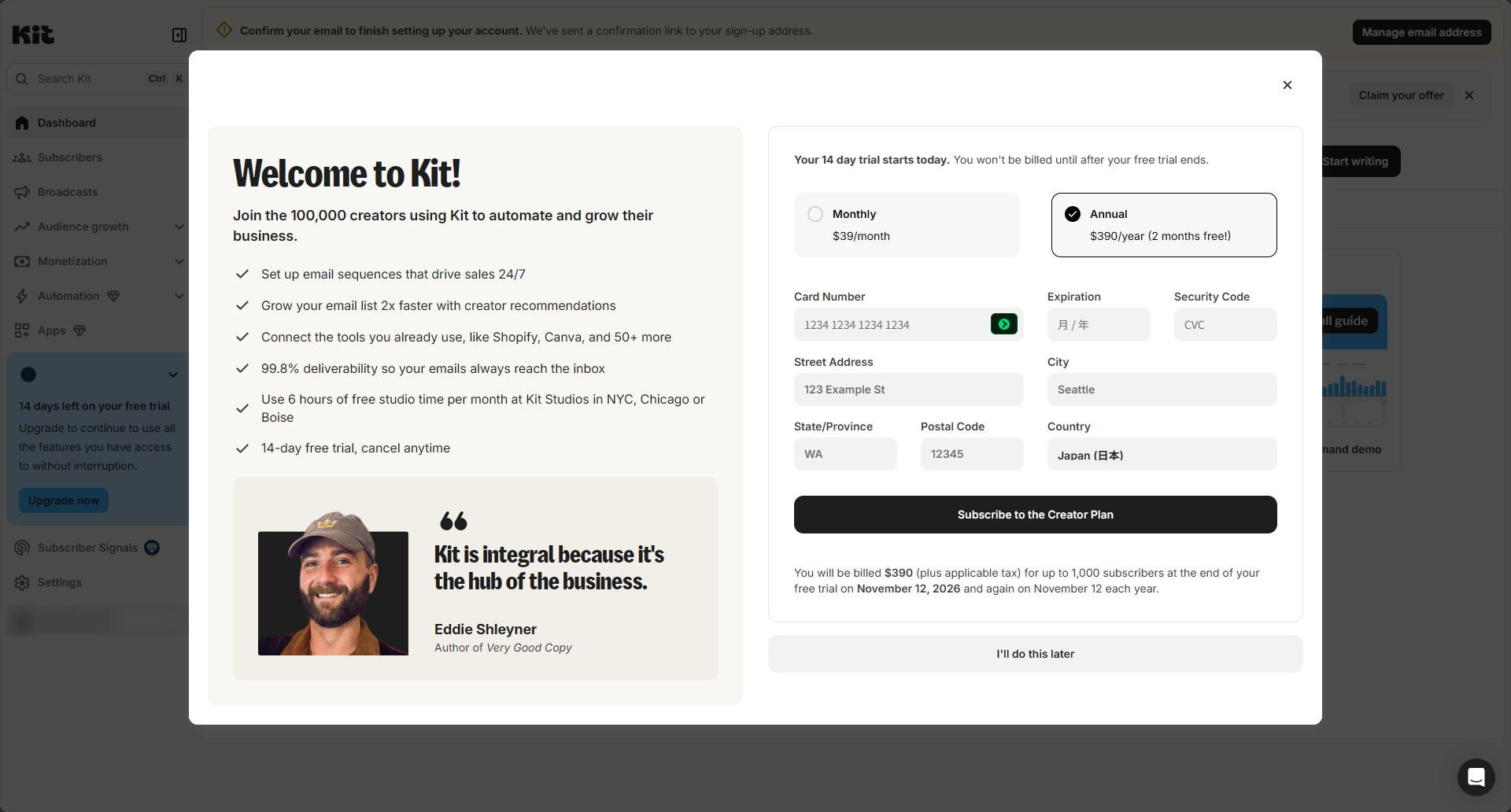
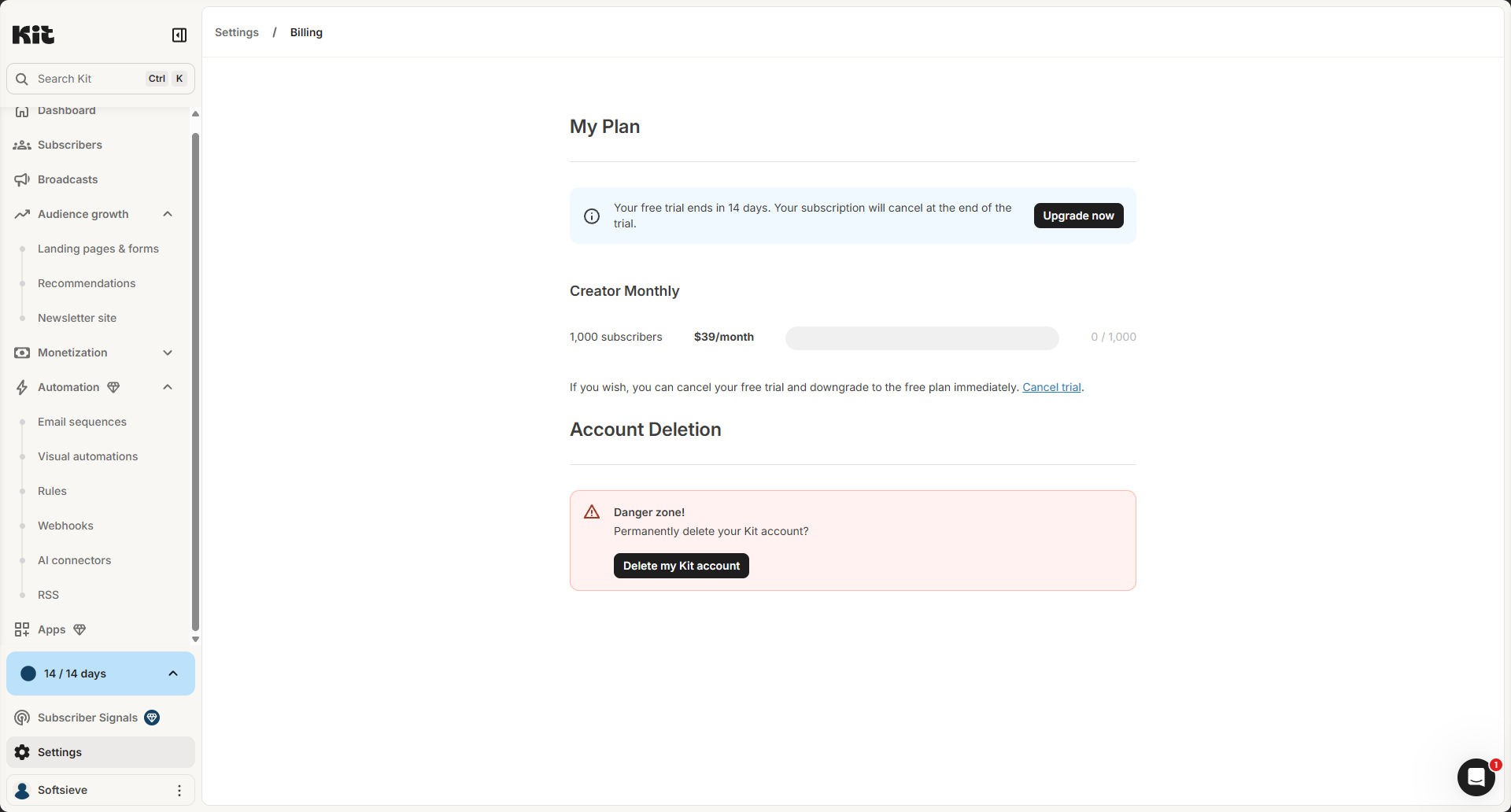
What signing up looked like: When we created a Kit account on the free plan in October 2026, a pop-up offering a 14-day Creator trial appeared right after the setup questions. It asks for a card, but you can close it without entering one by clicking "I'll do this later" at the bottom. It's easy to miss, so look for it before you type in card details. Even without a card, our account was put on the Creator trial automatically. Kit's Billing page said the subscription would cancel when the trial ends, which means no charge if you never add a card, and it also offered a "Cancel trial" link to drop back to the free plan right away. Kit's billing screens listed Creator at $39/month billed monthly, or $390/year billed annually, for up to 1,000 subscribers (October 2026).
Migration: Kit has a Mailchimp importer that connects with your Mailchimp API key, or you can upload a CSV. Kit's migration page says its team will move you for free, but only if you're on a paid plan.
Downsides
- Once you need automations, Kit is not the cheap option. Creator starts at $39/month (1,000 subscribers), while Mailchimp Essentials starts at $13/month (500 contacts).
- Free-plan users get no free migration help, so you do the import yourself.
- Kit is built for creators. If you run a shop and want product-based emails, other tools fit better.
Not for you if: you need automated sequences but want to spend less than $20/month, or you run an e-commerce store.
Brevo: best for large lists you don't email often
Brevo charges by emails sent, not contacts stored. Its free plan allows 300 emails per day, with no time limit and no credit card required. Brevo's email campaign page says the free plan holds up to 100,000 contacts.
Paid plans start with Starter, from $9/month for 5,000 emails a month, according to Brevo's marketing pages. Paid plans remove the daily sending cap (Brevo help). Brevo lists "No Brevo logo" as a Starter feature (Brevo). The page doesn't say so directly, but that suggests free-plan emails carry Brevo branding.
Here's how the math works: With 2,000 subscribers, 5,000 emails a month covers about two newsletters. If you email that list every week, you'll need a bigger sending tier. Use Brevo's slider to price it.
On the free plan, the 300-per-day cap means a 2,000-person newsletter can't go out in a single day. That's fine for occasional updates, but not for time-sensitive news.
Migration: Brevo has a native Mailchimp integration that imports and syncs your Mailchimp lists. Some limits apply:
- Only contacts who consented to hear from you in the last two years can be synced. Brevo may suspend campaigns sent to contacts without consent.
- Tags and address fields don't carry over, and dropdown-type fields aren't supported.
- Phone numbers must have 6 to 16 digits, or the contact won't import.
Downsides
- If you email a mid-sized list often, send-based pricing can cost more than contact-based pricing.
- The free plan's daily cap slows down your sends.
- Tags don't come across through the integration, so you'll need to rebuild your segments.
Not for you if: you send several emails a week to your whole list, or you rely heavily on Mailchimp tags.
GetResponse: best for small businesses that want email plus landing pages
GetResponse's free plan covers 500 contacts and 2,500 newsletters a month, with a drag-and-drop editor and signup forms. According to its help center:
- Every email sent from a free account carries a GetResponse badge.
- A/B testing isn't available.
- Inactive contacts count toward your limit.
- The 2,500 limit covers every type of message, including autoresponders and automation emails.
The Starter plan is GetResponse's entry paid plan. We couldn't confirm its current price from an up-to-date official page, so check the pricing page for your list size. A 14-day trial lets you test premium features first.
Migration: GetResponse's Mailchimp guide walks you through exporting a CSV from Mailchimp and importing it. Its import help page lists two limits: files can be up to 50 MB, and role addresses such as info@ aren't allowed. GetResponse offers hands-on migration for its MAX tier, but we couldn't confirm whether that's available or free on the smaller plans.
Downsides
- The free plan's 500-contact cap fits only the smallest lists in this guide.
- Role addresses (info@, sales@) are rejected on import, which matters for B2B lists.
- GetResponse has many features, from webinars to website building. If you only want a newsletter, that's more than you need.
Not for you if: you just want a simple newsletter (Kit's free plan covers more subscribers), or much of your list is role addresses.
ActiveCampaign: best if automation is why you're paying
ActiveCampaign has no free plan. Instead, its help center describes a 14-day trial with Professional-plan features, one user, and up to 100 email sends. Its pricing page says plans start at $15/month for 1,000 contacts (Starter), billed annually. We couldn't find a monthly-billing price on ActiveCampaign's official pages, so check the billing toggle before you compare it with tools priced month to month.
The Starter plan has limited segmentation and 5 actions per automation. That's enough for a simple welcome series, but not for branching workflows. More advanced automation needs a higher plan. The pricing page lists Plus at $49/month for 1,000 contacts, billed annually, though one of ActiveCampaign's comparison pages shows a different figure, so confirm the price when you sign up.
Migration: ActiveCampaign has more migration options than the others:
- Some accounts see an automated Mailchimp migration card. It connects with your Mailchimp API key, and most imports finish in one to two hours.
- The manual route uses CSV imports. Mailchimp groups become tags, and static segments must be rebuilt as tag-based segments.
- Forms and automations can't be imported, so you rebuild them.
- ActiveCampaign's onboarding page offers free migration of up to 10 "objects," such as lists, forms, or automations.
Downsides
- There's no free plan. For a list that only gets a newsletter, you'd be paying for tools you don't use.
- The 5-action limit on Starter means serious automation needs a more expensive plan.
- It has a steeper learning curve than Kit or Mailchimp.
Not for you if: you send one newsletter a week and nothing else, or you can't budget for a paid plan from day one.
Two more worth knowing about (no affiliate link)
We don't have affiliate relationships with these two, but they're worth a look:
- MailerLite: The free plan covers 250 active subscribers and 2,500 emails every 30 days. Paid plans start at $12/month. It's a common pick for people who want a simple editor without many extra features.
- beehiiv: The free plan covers up to 2,500 subscribers with unlimited sends. beehiiv renamed its plans in October 2026. It's built for publishers who want to grow and monetize a newsletter, not for store or service businesses.
How painful is switching? A step-by-step plan
These steps are based on Mailchimp's export docs and the import docs of the tools above.
1. Clean your list in Mailchimp first. Archive bounced and long-inactive contacts. You'll pay less at the new tool, and your sender reputation will be better on day one. Keep your unsubscribed contacts in a separate file. You need to suppress them at the new tool, not email them.
2. Export your audience. In Mailchimp, go to Audience, then Export audience. Mailchimp emails you when the file is ready. The download may be a ZIP with separate CSVs for subscribed, unsubscribed, non-subscribed, and cleaned contacts. Only Owners and Admins can export, and the files stay available for 30 days (Mailchimp help). Exports don't include open and click history, so download any reports you want to keep.
3. Import into the new tool. Use the native Mailchimp importer if there is one (Kit, Brevo, and some ActiveCampaign accounts). Otherwise, upload the "subscribed" CSV. Map your custom fields, and recreate tags or groups as tags.
4. Set up your sending domain. Gmail requires every sender to use SPF or DKIM. Bulk senders, meaning close to 5,000 or more messages a day to Gmail, need SPF, DKIM, and DMARC (Google). Each tool walks you through adding these DNS records. Do this before your first send.
5. Rebuild forms and automations. This is the slow part, because none of these tools reliably imports Mailchimp forms or automation logic. Replace the signup form embed codes on your website. If subscribers are partway through a Mailchimp automation, Kit's docs suggest letting them finish there, or restarting them in the new tool.
6. Run both tools for a short overlap. Keep Mailchimp active until the new forms are live. Then do a final sync or import to catch anyone who signed up during the move.
7. Send a normal email, then watch. Check open rates and spam complaints for the first few sends before you cancel Mailchimp.
How long it takes: For a list of a few thousand with one or two automations, the contact import itself is quick. Expect most of your time to go into steps 4 and 5.
Which one should you pick?
- "I send a weekly newsletter and nothing else." Start with Kit's free plan. Also consider beehiiv if you want growth and monetization tools.
- "My list is big, but I only email once or twice a month." Try Brevo, and price your monthly send volume on its slider.
- "I'm a small business that needs email, forms, and landing pages." Compare GetResponse Starter with MailerLite's paid plans.
- "Automation is the main reason I pay for email." Run a trial of ActiveCampaign, and check whether Starter's 5-action limit is enough for you.
- "I actually like Mailchimp, I just hate the bill." Archive unsubscribed and cleaned contacts first, then recheck your tier.
Whichever tool you choose, enter your exact contact count and monthly send volume into its pricing calculator before you commit. Plans and prices change, and the figures in this guide were checked in October 2026.
Sources
Checked October 29, 2026. Prices and plans change, so confirm on the vendor's page before you buy.
- mailchimp.com mailchimp.com/help/about-mailchimp-pricing-plans/
- mailchimp.com mailchimp.com/landers/pricing/essentials/
- mailchimp.com mailchimp.com/landers/pricing/standard/
- mailchimp.com mailchimp.com/help/about-non-subscribed-contacts/
- mailchimp.com mailchimp.com/help/archive-unarchive-contacts/
- mailchimp.com mailchimp.com/help/view-export-contacts/
- brevo.com brevo.com/email-campaign-software/
- brevo.com brevo.com/products/transactional-email/
- brevo.com brevo.com/newsletter-software/
- brevo.com brevo.com/products/marketing-platform/
- help.brevo.com help.brevo.com/hc/en-us/articles/8292912279954-Add-or-remove-emails-from-your-pl
- help.brevo.com help.brevo.com/hc/en-us/articles/10285672223378-Mailchimp-integration-by-Brevo-I
- kit.com kit.com/pricing
- help.kit.com help.kit.com/en/articles/16627071-the-kit-free-plan
- help.kit.com help.kit.com/en/articles/4494683-creator-vs-pro-choose-the-right-plan
- help.kit.com help.kit.com/en/articles/2502565-migrating-from-mailchimp-to-kit
- kit.com kit.com/migrations
- getresponse.com getresponse.com/pricing
- getresponse.com getresponse.com/pricing/free
- getresponse.com getresponse.com/help/how-many-messages-can-i-send-using-my-free-account.html
- getresponse.com getresponse.com/resources/guides/how-to-move-from-mailchimp-to-getresponse-guide
- getresponse.com getresponse.com/help/how-can-i-import-a-list-of-contacts.html
- activecampaign.com activecampaign.com/pricing
- activecampaign.com activecampaign.com/compare/mailchimp
- help.activecampaign.com help.activecampaign.com/hc/en-us/articles/218789987-Free-trial-capabilities
- help.activecampaign.com help.activecampaign.com/hc/en-us/articles/115000349684-Migrating-contacts-from-M
- help.activecampaign.com help.activecampaign.com/hc/en-us/articles/27421190157852-Migrate-from-another-em
- activecampaign.com activecampaign.com/services/onboarding
- mailerlite.com mailerlite.com/help/plan-and-billing
- mailerlite.com mailerlite.com/free-plan
- beehiiv.com beehiiv.com/pricing
- beehiiv.com beehiiv.com/blog/beehiiv-pricing-2026
- support.google.com support.google.com/mail/answer/81126?hl=en